SDelete v1.51
http://technet.microsoft.com/en-us/sysinternals/bb897443.aspx


Turn on dialling from the Lock screen
1. On the Home screen or in a folder, click the Options icon.
2. Click Password.
3. Set the Allow Outgoing Calls While Locked field to Yes.
4. Press the Menu key.
5. Click Save.
From:
http://docs.blackberry.com/en/smartphone_users/deliverables/11299/Turn_on_dialing_from_the_Lock_screen_46_398682_11.jsp
There are new option call - Place Call in the device locked meun to allow me to make call when the device is locked.
No need to install and able to penetrate firewall for remote support.
The user only need to tell you the random share password, you will able to remote that machine.
By create a shortcut:
hcp://CN=Microsoft%20Corporation,L=Redmond,S=Washington,C=US/Remote%20Assistance/Escalation/Unsolici
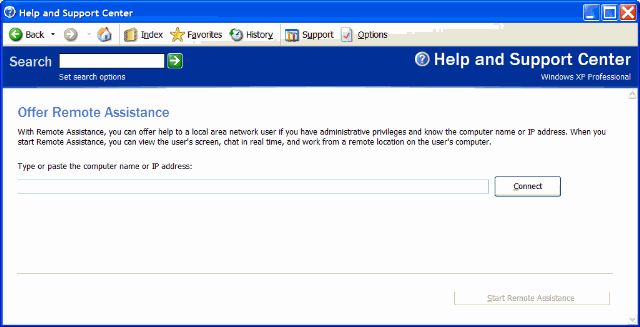
Offer Remote Assistance
With Remote Assistance, you can offer help to a local area network user if you have administrative privileges and know the computer name or IP address. When you start Remote Assistance, you can view the user's screen, chat in real time, and work from a remote location on the user's computer.
Type or paste the computer name or IP address:
UNetbootin allows you to create bootable Live USB drives for Ubuntu, Fedora, and other Linux distributions without burning a CD. It runs on both Windows and Linux. You can either let UNetbootin download one of the many distributions supported out-of-the-box for you, or supply your own Linux .iso file if you've already downloaded one or your preferred distribution isn't on the list.
UNetbootin can create a bootable Live USB drive, or it can make a "frugal install" on your local hard disk if you don't have a USB drive. It can load distributions by automatically downloading their ISO (CD image) files, or by using existing ISO files, floppy/hard disk images, or kernel/initrd files, for installing other distributions.
http://unetbootin.sourceforge.net/