Create a shortcut with %windir%\system32\msra.exe /offerra


By create a shortcut:
hcp://CN=Microsoft%20Corporation,L=Redmond,S=Washington,C=US/Remote%20Assistance/Escalation/Unsolici
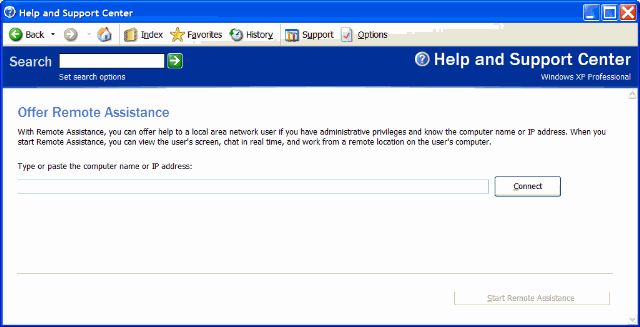
Offer Remote Assistance
With Remote Assistance, you can offer help to a local area network user if you have administrative privileges and know the computer name or IP address. When you start Remote Assistance, you can view the user's screen, chat in real time, and work from a remote location on the user's computer.
Type or paste the computer name or IP address:
If the remote assistance a program could not start and you find the following error in your event log:
Event Type: Error
Event Source: Remote Assistance
Event Category: None
Event ID: 5251
Date: 5/3/2010
Time: 4:27:02 PM
User: N/A
Computer: abc
Description:
The HelpAssistant account is disabled or missing, or the password could not be verified. Remote Assistance will be disabled. Restart the computer in safe mode and type the following text at the command prompt: sessmgr.exe -service. If the problem persists, contact Microsoft Product Support.
For more information, see Help and Support Center at http://go.microsoft.com/fwlink/events.asp.
The solution:
1. run sessmgr.exe -service
2. reboot the machine
Open Remote assistant admin console
"%ProgramFiles%\Internet Explorer\iexplore" hcp://CN=Microsoft%20Corporation,L=Redmond,S=Washington,C=US/Remote%20Assistance/Escalation/Unsolicited/Unsolicitedrcui.htm
Request Remote assistance shortcut
%SYSTEMROOT%\system32\rcimlby.exe –LaunchRA
Remote Assistance
Remote Assistance is disable in Domain environment by default
We need to enable it by GPO
Enable and configure Solicited Remote Assistance
Permit remote control of this computer: Allow helpers to remotely control the computer
Remark: (May be a bugs) The client’s control panel remote assistance tab will still no change, the check box will grey in color and no tick (show not enable) even the policy is running. (Need to check the policy by run rsop.msc or gpreult) and run the remote assistance wizard to test the policy is running or not.