Showing posts with label Windows 11. Show all posts

Monday, February 9, 2026

Microsoft Defender Hardening for Windows 11

Microsoft Defender Hardening:

Home:
PS C:\Windows\system32> Set-MpPreference -SignatureUpdateInterval 1

PS C:\Windows\system32> Set-MpPreference -CheckForSignaturesBeforeRunningScan 1

PS C:\Windows\system32> Set-MpPreference -MAPSReporting Advanced -SubmitSamplesConsent SendSafeSamples -CloudBlockLevel High -CloudExtendedTimeout 50
PS C:\Windows\system32> Set-MpPreference -PUAProtection Enabled
PS C:\Windows\system32> Set-MpPreference -EnableNetworkProtection Enabled


MAPS、Cloud Protection 和 PUA 在家用版上是完全有效

Pro/Enterprise:
Able to add ASR Rule:
系統限制:ASR 規則在 Windows 10/11 專業版 (Pro) 上可部分運行,但官方正式支援為 企業版 (Enterprise)。
前置要求:必須將 Microsoft Defender 設為主要防毒軟體,且開啟即時防護與雲端傳送防護。

Reference:

Print Friendly and PDF
Share/Bookmark

Wednesday, December 31, 2025

Windows 11 (24H2) explorer crashes when opening folder after Windows update

Issue: Windows Update bugs.

Solution:

Use admin right to run the following powershell command:

Add-AppxPackage -Register -Path 'C:\Windows\SystemApps\MicrosoftWindows.Client.CBS_cw5n1h2txyewy\appxmanifest.xml' -DisableDevelopmentMode 
Add-AppxPackage -Register -Path 'C:\Windows\SystemApps\Microsoft.UI.Xaml.CBS_8wekyb3d8bbwe\appxmanifest.xml' -DisableDevelopmentMode 
Add-AppxPackage -Register -Path 'C:\Windows\SystemApps\MicrosoftWindows.Client.Core_cw5n1h2txyewy\appxmanifest.xml' -DisableDevelopmentMode 
Then, reboot your machine

Reference:

Print Friendly and PDF
Share/Bookmark

Thursday, November 7, 2024

Windows 11 hardening by hotcakex.github.io


Print Friendly and PDF
Share/Bookmark

Monday, July 1, 2024

Windows 11 Update failed - Realtek Semiconductor Corp. - Extension - 6.0.9411.1

Solution:

Click the pause updates foe a week button and then click check updates.

Reference:

https://answers.microsoft.com/en-us/windows/forum/all/realtek-semiconductor-corp-extension-6094111/905ee855-f5c8-4b6b-ac58-d3f758bde4e5?page=1


Print Friendly and PDF
Share/Bookmark

Wednesday, June 19, 2024

Windows 11 Windows Update failed after sysprep

 If you installed Remote Server Administration Tools (RSAT) on Windows 11 then you uninstall it before your run sysprep. You machine from this image will failed to apply Windows monthly update.

Print Friendly and PDF
Share/Bookmark

Saturday, February 24, 2024

Prepare for NTLM disable in your domain environment


Microsoft has made an announcement stating that the NTLM authentication protocol will be disabled in Windows 11. Instead, it will be replaced by Kerberos, which is currently the default authentication protocol in Windows versions above Windows 2000.


https://petri.com/microsoft-disable-ntlm-windows-11/


To prepare for this change is coming, you can enable a GPO to audit what application is using NTLM I n your environment and also what version of NTLM still using?


https://learn.microsoft.com/en-us/troubleshoot/windows-server/windows-security/audit-domain-controller-ntlmv1

https://superuser.com/questions/1694421/how-can-i-find-out-what-is-using-ntlm-in-my-environment

https://mahim-firoj.medium.com/how-to-check-what-ntlm-version-you-are-using-in-your-domain-9eb4aed9f317

https://4sysops.com/archives/auditing-and-restricting-ntlm-authentication-using-group-policy/


Print Friendly and PDF
Share/Bookmark

Tuesday, December 5, 2023

Install Windows 11 without internet connection (23H2)

When it request you to connect Internet, use the "Shift + F10" keyboard shortcut. (Some laptop need to press "FIN + Shift +F10")

In command prompt, enter "OOBE\BYPASSNRO"

Then, the setup wizard will re-run and you have an option to select "I don't have internet"


Print Friendly and PDF
Share/Bookmark

AVITA - ESSENTIAL NE14A2IEE435 - Windows 11 fine tune

  1. Reinstall the machine to Windows 11 23H2
  2. Run Windows Update to apply latest patches and drivers
  3. Disable shadows, animations, and visual effects
  4. Disable transparency
  5. Change power settings to "High performance"
  6. Disable Game mode


Reference:

Print Friendly and PDF
Share/Bookmark

AVITA - ESSENTIAL 14吋 NE14A2IEE435 手提電腦 - Openbox test

- 14吋防眩螢幕提供舒適視角
- 內置SATA 固態硬碟(SSD)128GB
- Windows 11 家用版 S mode (英語系統)
- 處理器AMD Athlon™ Silver 3050e
- 記憶體4GB DDR4
- 顯示卡AMD Radeon™ Graphics
- 約1.377 kg

Pros: Very cheap (HK$ 998) form mega sale

Cons:
1. Windows 11 is (S mode), you can run applications from Microsoft Store only. Actually, you can switch it back to Windows 11 home edition by login Microsoft Store and select "Switch out of S mode" What is Windows S Mode? - Reviewed (usatoday.com)
2. The CPU and RAM are limited, the overall performance are not good running Windows 11 even under S mode
3. New machine battery is empty need to charge for a while before able to power on
4. Keyboard layout is different e.g. "@" not on number 2 key (It is UK default keyboard layout not US)

100Mbps broadband:


Print Friendly and PDF
Share/Bookmark

Wednesday, November 1, 2023

Freeware to enhance Microsoft Defender Security (Windows 10 and 11)

Microsoft Defender User need to consider to use DefenderUI or Configuredender to enhance your security since they able to enable many hidden security features of Microsoft Defender.

More detail:
DefenderUI (Need to install) and Configuredefender (No need to install)

Print Friendly and PDF
Share/Bookmark

Saturday, August 12, 2023

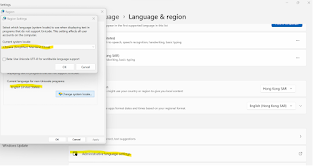
Cannot show simplified chinese in notepad

Problem:


Solution:


Press Language & Region on the left, then click Administrative Language Settings under the Related Settings section. The Region window will open up to the Administrative tab. Under the "Language for non-Unicode Programs" section, click the Change System Locale button, - change it to "Chinese (Simplified, Mainland China)


After that, it will able to show simplified chinese in notepad:


Print Friendly and PDF
Share/Bookmark

Friday, September 23, 2022

Window 11 setup without internet access

  1. Shift + F10
  2. Type "taskmgr"
  3. Kill "Network Connection Flow"


Reference:

https://youtu.be/Olrsu3dCGwc 


Print Friendly and PDF
Share/Bookmark

Fix Minecraft High CPU Usage & Your Laptop / PC Overheating For Windows 11/10

Print Friendly and PDF
Share/Bookmark

Monday, March 14, 2022

Microsoft Defender - enable Microsoft Active Protection Service (MAPS) on Windows 11 Pro

  1. Go to Local Group Policy Editor (GPedit.msc)
  2. Computer Configuration -> Administrative template -> Windows  Components -> Microsoft Windows Defender Antivirus  -> MAPS
  3. Join Micrsoft MAPS - Enable - Advanced MAPS

  1. Enable the following policy:


  1. Reboot your machine.


  1. Check the running configuration of the MAPS:

Open Powershell

Run the command: get-mppreference

PS C:\WINDOWS\system32> get-mppreference


The MAPSReporting - "2"


Reference:

加固 Windows Defender ,开启微软云保护,利用「微软高级保护服务」(MAPS)来实时预防未知病毒 - 小众软件

https://www.appinn.com/windows-defender-enable-microsoft-maps/


"著名黑客 h0ek 教路,只需在 Windows Defender 加上一點就可以得到企業級的保護 - Qooah" https://qooah.com/2022/03/14/famous-hacker-h0ek-teaches-the-way-to-get-enterprise-grade-protection-with-just-a-little-bit-of-windows-defender/ 


Print Friendly and PDF
Share/Bookmark

Sunday, February 6, 2022

How to stop your machine to upgrade to Windows 11 when you receive a message your machine will upgrade to Windows 11 after boot?

  1. Stop the Windows Update Service
  2. Delete the file in "Software Distribution" folder which can be found in "C: \Windows".
  3. Go to registry to set the Windows update target release version to 21H2
  4. Reboot your machine without click the upgrade
  5. Go to https://www.microsoft.com/en-hk/software-download/windows10 to run the Windows 10 upgrade to upgrade your machine to Windows 10 November 2021 Update (21H2)


https://www.howtogeek.com/765377/how-to-block-the-windows-11-update-from-installing-on-windows-10/ 

https://www.istarapps.com/delete-windows-update-files-completely.html

https://www.ghacks.net/2020/06/27/you-can-now-set-the-target-windows-10-release-in-professional-versions/


Print Friendly and PDF
Share/Bookmark

Thursday, February 3, 2022

Windows 10 Insider on Dev Channel but failed to upgrade to Windows 11

My machine is X220 which is not compatible to upgrade to Windows 11, since I cannot leave the Insider Dev Channel without reinstall the machine without data loss….So, I decided to force my machine to upgrade to Windows 11 GA to keep my data and also installed program.


Since my machine did not have TPM, I need to upgrade Windows 11 without TPM


  1. Go to "HKEY_LOCAL_MACHINE\SYSTEM\Setup\MoSetup" and press Enter. Add a DWORD value, name it "AllowUpgradesWithUnsupportedTPMOrCPU," and set it to 1.


  1. Go to HKEY_LOCAL_MACHINE > SYSTEM > Setup and create the key LabConfig.

Add a DOWRD value called "BypassTPMCheck" and set it to 1. Then add another one called "BypassCPUCheck" and set that to 1 as well.


Then create a ISO with the Media Creation Tool, extract all file into a folder.


Then delete the appraiserres.dll and also mount a Windows 10 ISO to copy the aappraiserres.dll into the Windows 11 installation source folder


launch setup, and perform an in-place upgrade on your system.


After the upgrade completed, you will receive a message you cannot enter the Windows insider program on this machine for Windows 11.


And my machine running on the Windows 11


Reference:

PC on Dev channel not compatible with Win11 - Microsoft Tech Community

Unable to participate in Windows 11 dev channel - Microsoft Community


How to Bypass Windows 11's TPM, CPU and RAM Requirements | Tom's Hardware (tomshardware.com)

How to bypass the Windows 11 TPM 2.0 requirement (bleepingcomputer.com)

Install Windows 11 without TPM Registry Hack - Virtualization Howto

Here's how to bypass Windows 11's TPM and CPU requirements | TechSpot

3 Ways to Upgrade Windows 10 to Windows 11 without TPM 2.0 (isumsoft.com)

Installing Windows 11 on Unsupported Hardware: How to Remove Appraiserres.dll to Bypass Requirements When Using Setup (nerdschalk.com)

How To Remove or Replace appraiserres.dll in Windows 11 Setup (nerdschalk.com)

Win11 ISO鏡像流出:教你繞過TPM 2.0限制安裝運行 | XFastest News

老電腦安裝 Windows 11,跳過系統需求檢查完美無損安裝! | jkgtw's blog 


Print Friendly and PDF
Share/Bookmark