Showing posts with label Vulnerability. Show all posts

Tuesday, July 9, 2024

Cisco ASA and CVE-2024-6387

For the ASA: 
 - Releases before 9.17 (not included) are not affected. 
 - Releases between 9.17 (included) and 9.19 (not included) are affected if configured to use CiscoSSH (non default configuration) 
 - Releases 9.19 and greater are affected with the default configuration

Reference:

Print Friendly and PDF
Share/Bookmark

Tuesday, February 20, 2024

Cisco ASA SSL VPN Vulnerability - CVE-2023-20275


It is required to upgrade to Version 9.12(4)65 – 1/25/2024 or later or higher version with latest patches.

Reference:
https://www.cybersecurity-help.cz/vdb/SB2023120533

Print Friendly and PDF
Share/Bookmark

Friday, February 9, 2024

FG-IR-24-015 (CVE-2024-21762) (CVSS 9.6) - Fortinet Fortigate firewall

Product Security Incident Response Team (PSIRT) advisory regarding our FortiOS. 

FG-IR-24-015: FortiOS - Out-of-bound Write in sslvpnd An out-of-bounds write vulnerability (CWE-787) in FortiOS could potentially allow a remote unauthenticated attacker to execute arbitrary code or commands through specially crafted HTTP requests.


And also, the local in policy to enhance the SSL security should be considered:

Config firewall local-in-policy

Edit 4

Set intf "portx" (x is the port number for Public Internet)

Set srcaddr "trusted source IP"

Ste dstaddr "all"

Set action accept

Set service "SSLVPN_10443"

Set schedule "always"

Set status enable

Next

Edit 3

Set intf "portx" (x is the port number for Public Internet)

Set srcaddr "all"

Set dstaddr "all"

Set service "SSLVPN_10443"

Set action deny

Set schedule "always"

Set status enable

Next

end

There are several SSL VPN enhancements consideration:

For long term, you should plan for replace your SSL VPN to ZTNA:

Reference:


Print Friendly and PDF
Share/Bookmark

Thursday, January 25, 2024

Fortinet Fortigate - Virtual patching on the local-in management interface

Under Vdom > .root command prompt:


How to check the configuration is running?

Under global command promote:


reference:

Virtual patching on the local-in management interface


Print Friendly and PDF
Share/Bookmark

Saturday, December 16, 2023

A very good security feature on Fortinet Fortigate you should enable to protect your firewall against vulnerability

Virtual patching on the local-in management interface

Virtual patching is a method of mitigating vulnerability exploits by using the FortiGate's IPS engine to block known vulnerabilities. Virtual patching can be applied to traffic destined to the FortiGate by applying the FMWP (Firmware Virtual Patch) database to the local-in interface using local-in policies. Attacks geared towards GUI and SSH management access, for example, can be mitigated using the FMWP database pushed from FortiGuard, thereby virtually patching these vulnerabilities.


Print Friendly and PDF
Share/Bookmark

Thursday, November 2, 2023

K000137353: BIG-IP Configuration utility unauthenticated remote code execution vulnerability CVE-2023-46747

To consider the mitigation method,   the vulnerability only affect the F5 web portal, it can be mitigated by setting self ip address without allowing port 443, and restrict ip address to access F5 management IP to web portal.


  1. Self IPs - Port lockdown - Allow none (If you are using HA, you need to use Allow 4353 and 1026)

    https://my.f5.com/manage/s/article/K17333 

    For optimal security, when configuring for high availability (HA) network failover, F5 recommends the following when configuring the Port Lockdown setting: Note: When BIG-IP devices are configured in a synchronization group, peer devices communicate using Centralized Management Infrastructure (CMI) on tcp:4353 on the self IP address, regardless of the port lockdown settings. Refer to the Port lockdown exceptions section of this article for additional information. BIG-IP Configuration utility unauthenticated remote code execution vulnerability CVE-2023-46747 (f5.com)


     TCP       4353      iQuery 

     UDP       4353      iQuery 

     UDP       1026      network failover 


    Remain port 4353 and port 1026 


    For safe,  you can consider adding script  to one of F5 (e.g. active)  first, and then monitor a period of time https://my.f5.com/manage/s/article/K000137353


  2. run command #tmsh -c "list sys httpd allow" to check the IP allow to access the F5 manageent IP to web portal and restrict it to Internal trust IP e.g. jump server.

Reference:


Print Friendly and PDF
Share/Bookmark

Wednesday, September 6, 2023

ASUS routers RT-AX55, AX56U_V2 and RT-AC86U vulnerable to critical remote code execution flaws (CVSS 9.8)

The Asus RT-AX55 and AX56U_V2 are same hardware and firmware but different market only.


The AX56U are different hardware and firmware. And also, the AX56U latest firmware on ASUS RT-AX56U 韌體版本 3.0.0.4.386.51665


Firmware:

ASUS RT-AX55 Firmware version 3.0.0.4.386_52041

Version 3.0.0.4.386_52041

65.17 MB

2023/08/31

https://www.asus.com/networking-iot-servers/whole-home-mesh-wifi-system/all-series/rt-ax55/helpdesk_bios/?model2Name=RT-AX55


Reference:

https://www.bleepingcomputer.com/news/security/asus-routers-vulnerable-to-critical-remote-code-execution-flaws/?s=03 

https://www.hkepc.com/forum/viewthread.php?fid=12&tid=2598705&extra=&page=2

https://www.hkepc.com/forum/viewthread.php?fid=12&tid=2598169&page=1

https://rog-forum.asus.com/t5/gaming-network-products/rt-ax56u-high-cpu-and-high-ram-leading-to-stop-routing-after-a/td-p/930133/page/2

TWCERT/CC台灣電腦網路危機處理協調中心|企業資安通報協處|資安情資分享|漏洞通報|資安聯盟|資安電子報-ASUS RT-AX55RT-AX56U_V2RT-AC86U - Format String - 1

TWCERT/CC台灣電腦網路危機處理協調中心|企業資安通報協處|資安情資分享|漏洞通報|資安聯盟|資安電子報-ASUS RT-AX55RT-AX56U_V2RT-AC86U - Format String - 2

TWCERT/CC台灣電腦網路危機處理協調中心|企業資安通報協處|資安情資分享|漏洞通報|資安聯盟|資安電子報-ASUS RT-AX55RT-AX56U_V2RT-AC86U - Format String - 3


Print Friendly and PDF
Share/Bookmark

Monday, August 21, 2023

PDFCreator hit the Ghostscript 9.8/10 RCE vulnerability (CVE-2023-36664) - it just release 5.1.2 on 21 Aug 2023 to fix this issue (Very fast)

Background:

In 13 Jul 2023, Security researchers have discovered a critical vulnerability (CVE-2023-36664) in Ghostscript, an open-source interpreter for PostScript language and PDF files widely used in Linux and Windows's Open Source application. The vulnerability has a Common Vulnerability Scoring System (CVSSv3) score of 9.8 out of 10.


In 14 Aug 2023, the POC of this vulnerability have been released. https://github.com/jakabakos/CVE-2023-36664-Ghostscript-command-injection?s=03 


(Basically all PDF Printer using Ghostscript will hit this vulnerability unless it is using 10.01.2)


Successful exploitation of this vulnerability could allow a remote attacker to execute arbitrary code through a specially crafted file due to improper handling of permission validation for pipe devices.


The vulnerability affects all versions of Ghostscript before 10.01.2. Applications on other operating systems, such as Windows, that use a port of affected Ghostscript versions also inherit this vulnerability.


Users and administrators of Linux systems are advised to upgrade to the latest version of Ghostscript, 10.01.2, using their distribution's package manager.


Users and administrators of open-source software that use ports of Ghostscript, such as LibreOffice, GIMP, Inkscape, Scribus, and ImageMagick, are advised to update to the latest versions when they are made available.


Sigma rules to detect possible exploitation of CVE-2023-36664 are available at https://github.com/KrollCYB/Kroll-CYB/tree/main/CVE-2023-36664.

More information is available here:

https://www.kroll.com/en/insights/publications/cyber/ghostscript-cve-2023-36664-remote-code-execution-vulnerability

https://www.bleepingcomputer.com/news/security/critical-rce-found-in-popular-ghostscript-open-source-pdf-library/


For open-source software on Windows that use ports of Ghostscript, the process of moving to the latest version may take longer, thus extra caution is advised for Windows installations.

https://vulnera.com/newswire/critical-remote-code-execution-vulnerability-discovered-in-ghostscript-pdf-library/


POC:

https://github.com/jakabakos/CVE-2023-36664-Ghostscript-command-injection?s=03 


Reference:

https://www.pdfforge.org/blog/pdfcreator-51-release

5.1.1 latest version which is released on May 15, 2023

https://www.pdfforge.org/blog/pdf-creator-5-1-1-maintenance-release

https://cn-sec.com/archives/1874078.html

https://www.csa.gov.sg/alerts-advisories/alerts/2023/al-2023-095


PDFCreator 5.1.2 have been released on 2023-08-21 to fix this vulnerability
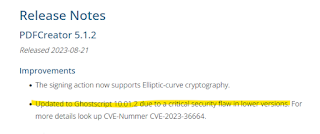
 

https://docs.pdfforge.org/pdfcreator/en/pdfcreator/introduction/whats-new/


Stable Release 5.1.2 published on 2023-08-21

https://download.pdfforge.org/


Print Friendly and PDF
Share/Bookmark

Monday, March 13, 2023

Veeam Backup & Replication CVE-2023-27532


  • This vulnerability affects all Veeam Backup & Replication versions.
  • If you use an earlier Veeam Backup & Replication version, please upgrade to a supported version first.
  • If you use an all-in-one Veeam appliance with no remote backup infrastructure components, you can alternatively block external connections to port TCP 9401 in the backup server firewall as a temporary remediation until the patch is installed.
  • The patch must be installed on the Veeam Backup & Replication server. All new deployments of Veeam Backup & Replication versions 12 and 11a installed using the ISO images dated 20230223 (V12) and 20230227 (V11a) or later are not vulnerable.


Before Patch:


After Patch:

You will see the patch number "P20230227" on the Build number


Reference:

KB4424: CVE-2023-27532 (veeam.com)


Print Friendly and PDF
Share/Bookmark

Tuesday, April 26, 2022

Information Security - Infohub in mainland China

《安全内参》是专注于网络安全产业发展和行业应用的高端智库平台,依托于专业的安全团队和国内外产业和行业智库的专家团队,为网络安全相关政府主管、行业、企业和机构的管理者、决策者和从业者提供全球视野、高价值的安全知识和安全智慧,致力于成为网络安全首席知识官。

https://www.secrss.com/ 


安全牛是中国网络安全领域的专业媒体和旗舰智库,精确定位并服务于CISO/CSO/CTO/CIO决策者人群,向国内企业的决策管理者以及IT专业人士提供独立客观、高品质、有价值的战略性网络安全内容。安全牛致力于推动中国企业跨越"安全鸿沟",促进中国网络安全产业的健康发展。

https://www.aqniu.com/# 


Print Friendly and PDF
Share/Bookmark

Friday, January 5, 2018

Massive Intel CPU Bug Leaves Kernel Vulnerable, Slows Performance - Intel CPU kernel memory leak vulnerability #Spectre (CVE-2017-5753 , CVE-2017-5715) and #Meltdown (CVE-2017-5754) #SideChannelAttack

The hotfix from Microsoft, RedHat and VMware at the following:

platform

solution

Windows2008

Not available

https://support.microsoft.com/en-us/help/4072698/windows-server-guidance-to-protect-against-the-speculative-execution-s

Windows2008R2

KB4056897

https://support.microsoft.com/en-us/help/4072698/windows-server-guidance-to-protect-against-the-speculative-execution-s

Windows2012

Not available

https://support.microsoft.com/en-us/help/4072698/windows-server-guidance-to-protect-against-the-speculative-execution-s

Windows2012R2

KB4056898

https://support.microsoft.com/en-us/help/4072698/windows-server-guidance-to-protect-against-the-speculative-execution-s

ESXi5.5

ESXi550-201709101-SG

https://www.vmware.com/security/advisories/VMSA-2018-0002.html

ESXi6.5

ESXi650-201712101-SG

https://www.vmware.com/security/advisories/VMSA-2018-0002.html

Redhat7

RHSA-2018:0007

https://access.redhat.com/security/vulnerabilities/speculativeexecution

Redhat6

RHSA-2018:0008

https://access.redhat.com/security/vulnerabilities/speculativeexecution


For windows patch deployment, if using Mcafee, it need to update register key "HKEY_LOCAL_MACHINE\SOFTWARE\Microsoft\Windows\CurrentVersion\QualityCompat" first.

https://support.microsoft.com/en-us/help/4056898

image


WINDOWS
About the intel vulnerability on Windows (not Azure specific), pls find our published info and patches below.
https://portal.msrc.microsoft.com/en-US/security-guidance/advisory/ADV180002
Update for Windows Server 2016 is available here:
https://support.microsoft.com/en-us/help/4056890
Windows 10 1709 (Fall Creators Update):
https://support.microsoft.com/en-us/help/4056892
Updates for other OS versions:
http://www.catalog.update.microsoft.com/Search.aspx?q=2018-01


Windows Client Guidance for IT Pros to protect against speculative execution side-channel vulnerabilities

https://support.microsoft.com/en-us/help/4073119/windows-client-guidance-for-it-pros-to-protect-against-speculative-exe?ranMID=24542&ranEAID=nOD%2FrLJHOac&ranSiteID=nOD_rLJHOac-9l5jOPaPqmkvZwSt.6rR0w&tduid=(72882831a6cc2b13e2bb4cdc8c5e787f)(256380)(2459594)(nOD_rLJHOac-9l5jOPaPqmkvZwSt.6rR0w)()


RedHat Enterprise Linux:
The vulnerability has been assigned CVE-2017-5754, CVE-2017-5753 & CVE-2017-5715. This issue was publicly disclosed on Wednesday, January 3, 2018 and is rated as Important [1].
Kernel Side-Channel Attacks (CVE-2017-5754, CVE-2017-5753, & CVE-2017-5715)
https://access.redhat.com/security/vulnerabilities/speculativeexecution


Reference:
https://www.extremetech.com/computing/261364-massive-intel-cpu-bug-leaves-kernel-vulnerable-reduce-performance
https://www.theregister.co.uk/2018/01/02/intel_cpu_design_flaw/
https://www.theverge.com/2018/1/3/16844630/intel-processor-security-flaw-bug-kernel-windows-linux
https://www.techpowerup.com/240174/intel-secretly-firefighting-a-major-cpu-bug-affecting-datacenters
https://news.xfastest.com/intel/44421/intel-memory-leak-bug/
https://hothardware.com/news/intel-cpu-bug-kernel-memory-isolation-linux-windows-macos


There are more detail about the vulnerability:
Google Project Zero blog:
https://googleprojectzero.blogspot.hk/2018/01/reading-privileged-memory-with-side.html
Research paper:
https://spectreattack.com/spectre.pdf
https://meltdownattack.com/meltdown.pdf

Reference:
http://blog.cyberus-technology.de/posts/2018-01-03-meltdown.html
AMD Respond:
http://www.amd.com/en/corporate/speculative-execution
ARM Security:
https://developer.arm.com/support/security-update
Meltdown in Action: Dumping memory
https://m.youtube.com/watch?v=bReA1dvGJ6Y

Spectre and Meltdown processor security flaws – explained

https://www.theguardian.com/technology/2018/jan/04/meltdown-spectre-computer-processor-intel-security-flaws-explainer

How to protect your PC against the major ‘Meltdown’ CPU security flaw

https://www.theverge.com/2018/1/4/16848976/how-to-protect-windows-pc-meltdown-security-flaw


#Spectre #CVE20175715   #CVE20175753
#Meltdown #CVE20175754
#SideChannelAttack

Print Friendly and PDF
Share/Bookmark

Tuesday, December 5, 2017

Lenovo x230 upgrade Intel ME firmware (8.1.72.3002) to resolve SA-00086 vulnerability (Intel Management Engine Critical Firmware Update (Intel-SA-00086))

Firmware for Intel ME on x230 https://pcsupport.lenovo.com/hk/en/downloads/ds032435

Fixed the following security vulnerabilities: CVE-2017-5711, CVE-2017-5712, CVE-2017-13077, CVE-2017-13078, CVE-2017-13080.

After upgrade, the result at the following:

image

Download the detection tools

Intel-SA-00086 Detection Tool

https://downloadcenter.intel.com/download/27150

Reference:

https://www.intel.com/content/www/us/en/support/articles/000025619/software.html

https://www.intel.com.tw/content/www/tw/zh/support/articles/000025619/software.html

http://www.dell.com/support/article/us/en/19/sln308237/dell-client-statement-on-intel-me-txe-advisory--intel-sa-00086-?lang=en

https://unwire.hk/2017/11/22/intelmanagementengine/tech-secure/ Print Friendly and PDF
Share/Bookmark

Thursday, August 11, 2016

Moto X Gen 2 on 6.0 with security patch level at 1-Nov-2015 hit all Quadrooter vulnerability

Screenshot_20160810-225119


Waiting Lenovo/Motorola release security patch.......

Print Friendly and PDF
Share/Bookmark

Sunday, June 19, 2016

How to use workaround solution to hardening Windows XP to against two critical vulnerability (MS16-063) and (MS16-077)?

The vulnerability background:

以黑客教主之名,TK 發現了 Windows 史上最大漏洞

http://www.hksilicon.com/articles/1110674

Workaround:

1. Disable WINS/NetBT name resolution

BF51AA82ED8246C4B1FA6A34067BFEC0


2 Edit the hosts file to add the entry – 255.255.255.255 wpad

EFC8ABFDD8734F5590FBC999C245C59D

3. Disable Windows Scripting Host ( WSH )

By using Symantec noscript (Download: http://www.symantec.com/avcenter/noscript.exe)

8916F1789635411AACCEC8C2BF29059A

FABE24A2897F4085BD2B986380E09BDD


Or change the registry set the “Enabled” = 0 under HKEY_LOCAL_MACHINE\Software\Microsoft\Windows Script Host\Settings (Refer: http://www.thewindowsclub.com/windows-script-host-access-is-disabled-on-this-machine)

Remark: It is highly recommend to upgrade your machine to Windows 7 or above (The Windows 10 free upgrade from 7/8.1 will be end at 29 July 2016 – Don’t miss it)


There are some useful material to hardening Windows XP to minimal the security risk on continuous using Windows XP

http://www.nccst.nat.gov.tw/xpendofsupportintro


Reference:

https://technet.microsoft.com/en-us/library/security/ms16-077.aspx

https://technet.microsoft.com/en-us/library/security/ms16-063.aspx

http://www.windowsnetworking.com/kbase/WindowsTips/WindowsXP/AdminTips/Customization/DisableWindowsScriptingHostWSH.html

 http://www.thewindowsclub.com/windows-script-host-access-is-disabled-on-this-machine Print Friendly and PDF
Share/Bookmark