Thursday, February 22, 2024
Wednesday, June 1, 2022
Microsoft issued CVE-2022-30190 - a zero-day remote code execution vulnerability in the Microsoft Support Diagnostic Tool.
Follina (CVE-2022-30190): a vulnerability in MSDT
There are workaround by using ENS Access Protection rules to against this vulnerability:
The sample configuration of access protection:
https://community.mcafee.com/t5/Endpoint-Security-ENS/CVE-2022-30190-follina/m-p/704208
Microsoft issued CVE-2022-30190 - a zero-day remote code execution vulnerability in the Microsoft Support Diagnostic Tool.
Thursday, March 28, 2019
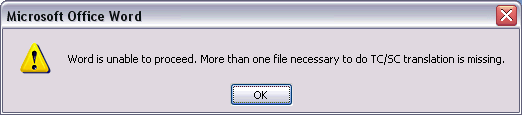
How to resolve the Microsoft Office Word 2016 error - Word is unable to proceed. More than one file necessary to do TC/SC translation is missing.
1. Uninstall the proofing tools
2. Install the language accessory pack (https://support.office.com/en-us/article/language-accessory-pack-for-office-82ee1236-0f9a-45ee-9c72-05b026ee809f?ui=en-US&rs=en-US&ad=US)
3. Re-Install the proofing tools
How to resolve the Microsoft Office Word 2016 error - Word is unable to proceed. More than one file necessary to do TC/SC translation is missing.
Sunday, March 6, 2011
How to Easily Convert OpenOffice ODT Documents to Microsoft Word DOC Format
http://www.groovypost.com/howto/how-to/convert-openoffice-odt-word-docx/
How to Easily Convert OpenOffice ODT Documents to Microsoft Word DOC Format
Sunday, December 19, 2010
Email Notification even if Outlook is Closed
http://www.nirmaltv.com/2010/11/19/email-notification-even-if-outlook-is-closed/
Email Notification even if Outlook is Closed
Friday, October 1, 2010
Secondary monitor of Show Presentation (MS PowerPoint 2007)
For the PowerPoint play in dual display issue, please try to use the following solution to solve the problem.
Got to "Slide Show" and select the secondary monitor of Show Presentation On: <The name of your secondary monitor>
Secondary monitor of Show Presentation (MS PowerPoint 2007)
MS Word 2007 - Eng is unable to proceed,More than one file necessary to do TC/SC translation is missing
When try to use Chinese translation between T. Chinese and S. Chinese.
| a) 安装office 2007 Multiple language pack |
OR
b) Install Office 2007 Proofing Tools
Reference:
http://yoke88.spaces.live.com/Blog/cns!E9D4B3DCE266C1B!1332.entry
MS Word 2007 - Eng is unable to proceed,More than one file necessary to do TC/SC translation is missing
Thursday, September 9, 2010
Free Word password / Excel password recovery software
Free Word / Excel Password Recovery Wizard offers the same functionality and performance as expensive commercial Word password / Excel password software, but is a completely free download.
http://www.freewordexcelpassword.com/
Free Word password / Excel password recovery software
Wednesday, July 7, 2010
Word 2007 no Chinese traditional/simple conversion function
開始
All programs
Microsoft Office
Microsoft Office 工具
Microsoft Office 語言設定 2007
編輯語言(Editing Languages)
主要編輯語言 (Primary editing language)
中文(香港特別行政區)或者 中文(臺灣)
確定
Source:
Word 2007 no Chinese traditional/simple conversion function
Wednesday, March 17, 2010
Monday, March 15, 2010
Open multiple instances of excel 2007
Use command
"C:\Program Files\Microsoft Office\Office12\EXCEL.EXE" /e
Open multiple instances of excel 2007
Thursday, February 18, 2010
MS word to tiff (.tif/.tiff)
Tuesday, December 8, 2009
English office 可提供細明體或新細明體等中文字型
Microsoft Office 2003/2007 English
control panel -> Regional and Language Options -> advanced page - > Chinese(Taiwan) match non-unicode
English office 可提供細明體或新細明體等中文字型