Under global vdom, security fabric, external connectors:

Add TWO external Connector:


Create TWO firewall rule, one is incoming and one is outgoing:


Reference:


Under global vdom, security fabric, external connectors:
Sumatra PDF (Set a default reader)
A PDF Viewer for Windows
http://blog.kowalczyk.info/software/sumatrapdf/download.html
Install the Adobe reader also, since the Sumatra PDF support open in adobe reader.
For pdf editing
doPDF7.1 free PDF converter
Silent install parameters for doPDF
This information is included in help too. These are the parameters accepted by the doPDF installer via command line:
Install parameters for doPDF
/SILENT, /VERYSILENT
Instructs Setup to be silent or very silent. When Setup is silent the wizard and the background window are not displayed but the installation progress window is. When a setup is very silent this installation progress window is not displayed. Everything else is normal, so for example error messages during installation are displayed.
If a restart is necessary and the /NORESTART command isn't used (see below) and Setup is silent, it will display a Reboot now? message box. If it's very silent it will reboot without asking.
/SUPPRESSMSGBOXES
Instructs Setup to suppress message boxes. Only has an effect when combined with /SILENT and /VERYSILENT.
/NOCANCEL
Prevents the user from canceling during the installation process, by disabling the Cancel button and ignoring clicks on the Close button. Useful along with /SILENT or /VERYSILENT.
/NORESTART
Instructs Setup not to reboot even if it's necessary.
/RESTARTEXITCODE=exit code
Specifies the custom exit code that Setup is to return when a restart is needed. Useful along with /NORESTART'.
/DIR="x:\dirname"
Overrides the default directory name displayed on the Select Destination Location wizard page. A fully qualified pathname must be specified.
/GROUP="folder name"
Overrides the default folder name displayed on the Select Start Menu Folder wizard page.
/NOICONS
Instructs Setup to initially check the Don't create a Start Menu folder check box on the Select Start Menu Folder wizard page.
/LANG="language"
Specifies the language to use for the installation. When a valid /LANG parameter is used, the Select Language dialog will be suppressed.
/Languages="language1-language2-..."
Specifies the languages that will be installed (e.g. /Languages="en-it-ro" will install the English, Italian and Romanian language packs). Language codes available in the current version:
ar - Arabic
bg - Bulgarian
br - Portuguese Brazilian
cs - Czech
ct - Chinese Traditional
de - German
en - English
es - Spanish
fi - Finnish
fr - French
gr - Greek
hu - Hungarian
it - Italian
ja - Japanese
kr - Korean
nl - Dutch
no - Norwegian
pl - Polish
pt - Portuguese
ro - Romanian
ru - Russian
sc - Chinese Simplified
si - Slovenian
sr - Serbian
sv - Swedish
tr - Turkish
vi - Vietnamese
uk - Ukrainian
/DefaultLang="language"
Specifies the default language. Use short language codes (exactly as those listed for the /Languages parameter above) or the REGST constant for Use regional settings option.
/Default
Instructs Setup to set the printer as default printer.
/NoInstallIfExists
Instructs setup to check if the same edition of doPDF is already installed. If found it does not start the installation.
/NoInstallIfVersion="major version.minor version.build no"
Instructs setup to check if doPDF is already installed. If found it checks what version is installed. If the version installed is older then the given parameter, it proceeds with installation. If the installed version is the same or newer then the given parameter, it does not start the installation.
Uninstall doPDF
The uninstaller has also some parameters for silent uninstall (they have the same meaning as for the installer, see above for details):
/SILENT
/VERYSILENT
/SUPPRESSMSGBOXES
/NORESTART
Reference:
http://www.dopdf.com/forum/topic/silent-install-parameters-for-dopdf
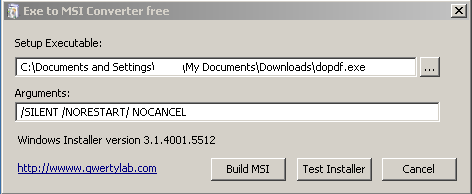
Use the “exe to MSI converter” to convert the doPDF to become a msi able to remote deploy by GPO.