Saturday, October 2, 2010
Google calendar add 香港假期
Login google calendar in broswer,
Left hand side –> other calendar, new calendar.
-> hong_kong__zh_tw@holiday.calendar.google.com
Back to mobile phone to sync this calendar.
Inside mobile google calendar –> Menu –> More –> My calendar –> select Hong Kong Holiday
AD Tidy
AD Tidy is a free tool to clean up your Active Directory domain by identifying unused user and computer accounts.
New Home
Friday, October 1, 2010
ThinkPad和ThinkCentre 無法使用 Ghost – Disk to Disk?
Solution:
Ghost use disk to disk to clone the hard disk
1. Use Windows 98 bootdisk to boot up the machine
2. Run > Fdisk /MBR
3. Use fdisk to check the C: is active
Done
Windows 98 Bootable CD Images
http://www.bootdisks.us/windows-98/13/windows-98-bootable-cd-images.html
Secondary monitor of Show Presentation (MS PowerPoint 2007)
For the PowerPoint play in dual display issue, please try to use the following solution to solve the problem.
Got to "Slide Show" and select the secondary monitor of Show Presentation On: <The name of your secondary monitor>
TOOL: "VDI Optimizer" - Optimizing Windows 7 Images for use in VDI
TOOL: "VDI Optimizer" - Optimizing Windows 7 Images for use in VDI
http://kurtsh.spaces.live.com/Blog/cns!DA410C7F7E038D!7695.entry
bginfo for server (update the content each time login)
1. Create a folder C:\BGinfo
2. Copy two files "Bginfo.exe" and "test.bgi".
3. Copy a bat, "bginfo.bat" to "C:\Documents and Settings\All Users\Start Menu\Programs\Startup"
The content of the bat is the following:
C:\BGInfo\Bginfo.exe /ic:\bginfo\test.bgi /timer:0
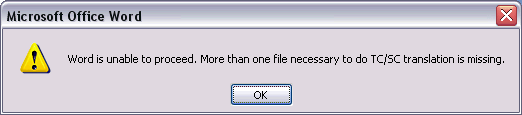
MS Word 2007 - Eng is unable to proceed,More than one file necessary to do TC/SC translation is missing
When try to use Chinese translation between T. Chinese and S. Chinese.
| a) 安装office 2007 Multiple language pack |
OR
b) Install Office 2007 Proofing Tools
Reference:
http://yoke88.spaces.live.com/Blog/cns!E9D4B3DCE266C1B!1332.entry
Lotus notes db fix in client
1. Go to the Start Menu and click Run.
2. Type cmd and press Enter. This will take you to a command prompt.
3. Type (with quotes) cd “C:\Program Files\Lotus\Notes” and press Enter.
4. Type Nfixup.exe and press Enter.
5. When finished, type NCompact.exe and press Enter.
6. When finished, type Nupdall.exe and press Enter.
7. Type exit to exit the command prompt window.
From:
http://www.companionlink.com/support/howto/ht0003.html
****************************************************************************************************************
Pressing SHIFT+F9 rebuilds the view you are currently in. Pressing CTRL+SHIFT+F9 updates all views in the database you are in.
NOTE: It does not matter if the views are hidden or open. Pressing CTRL+SHIFT+F9 will rebuild views on server-based or local databases. If the views are not built, Notes will build them. If the views are already built, Notes will update them, not rebuild them.
From:
WuInstall Freeware
WuInstall enforces Windows updates and makes the entire updating process user friendly
SysKey – Prevent Windows password cracks
The SysKey utility, also called the SAM lock tool, is a built-in Windows tool that allows you to secure the Security Accounts Management (SAM) Database.
Turn on dialling from the Lock screen - BlackBerry
Turn on dialling from the Lock screen
1. On the Home screen or in a folder, click the Options icon.
2. Click Password.
3. Set the Allow Outgoing Calls While Locked field to Yes.
4. Press the Menu key.
5. Click Save.
From:
http://docs.blackberry.com/en/smartphone_users/deliverables/11299/Turn_on_dialing_from_the_Lock_screen_46_398682_11.jsp
There are new option call - Place Call in the device locked meun to allow me to make call when the device is locked.
showmypc
No need to install and able to penetrate firewall for remote support.
The user only need to tell you the random share password, you will able to remote that machine.
Offer Remote Assistance to the end user by using IP/hostname
By create a shortcut:
hcp://CN=Microsoft%20Corporation,L=Redmond,S=Washington,C=US/Remote%20Assistance/Escalation/Unsolici
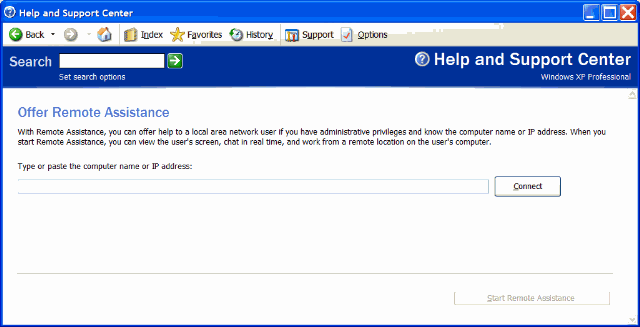
Offer Remote Assistance
With Remote Assistance, you can offer help to a local area network user if you have administrative privileges and know the computer name or IP address. When you start Remote Assistance, you can view the user's screen, chat in real time, and work from a remote location on the user's computer.
Type or paste the computer name or IP address:
UNetbootin
Introduction
UNetbootin allows you to create bootable Live USB drives for Ubuntu, Fedora, and other Linux distributions without burning a CD. It runs on both Windows and Linux. You can either let UNetbootin download one of the many distributions supported out-of-the-box for you, or supply your own Linux .iso file if you've already downloaded one or your preferred distribution isn't on the list.
Requirements
- Microsoft Windows 2000/XP/Vista/7, or Linux.
- A broadband internet connection to download the distribution's .iso file (unless you're using pre-downloaded files)
Features
UNetbootin can create a bootable Live USB drive, or it can make a "frugal install" on your local hard disk if you don't have a USB drive. It can load distributions by automatically downloading their ISO (CD image) files, or by using existing ISO files, floppy/hard disk images, or kernel/initrd files, for installing other distributions.